Overview
The Usage tab provides admins with visibility into how often users are logging into the Clozd Platform. This article will be broken out into the following sections:
Usage tab
This section provides visibility into your organization’s adoption and consumption of customer insights by seeing how often users are logging into the Clozd Platform.
To get to the Usage tab, click on the Admin drop-down on the left-hand side of the page. Then select Usage.
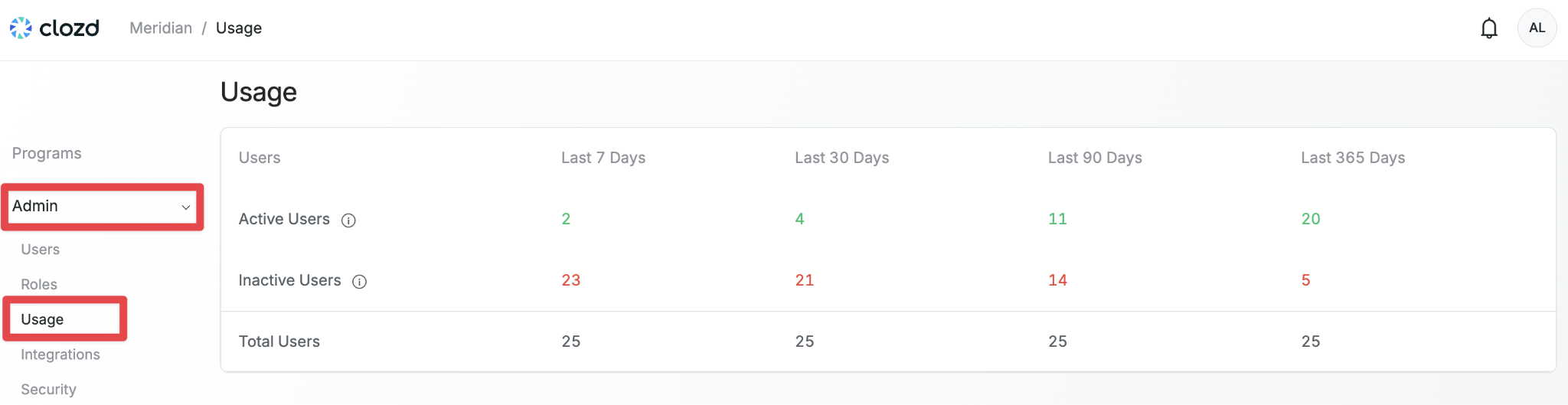
See how active users are by their login activity status. The amount of users showing as active or inactive will filter by periods of time (last 7, 30, 90, or 365 days)
- Active. Those who have logged into the Platform within a given time period.
- Inactive. Users that have not logged in within a given time period.
- Total Users represents the total number of users in the platform.
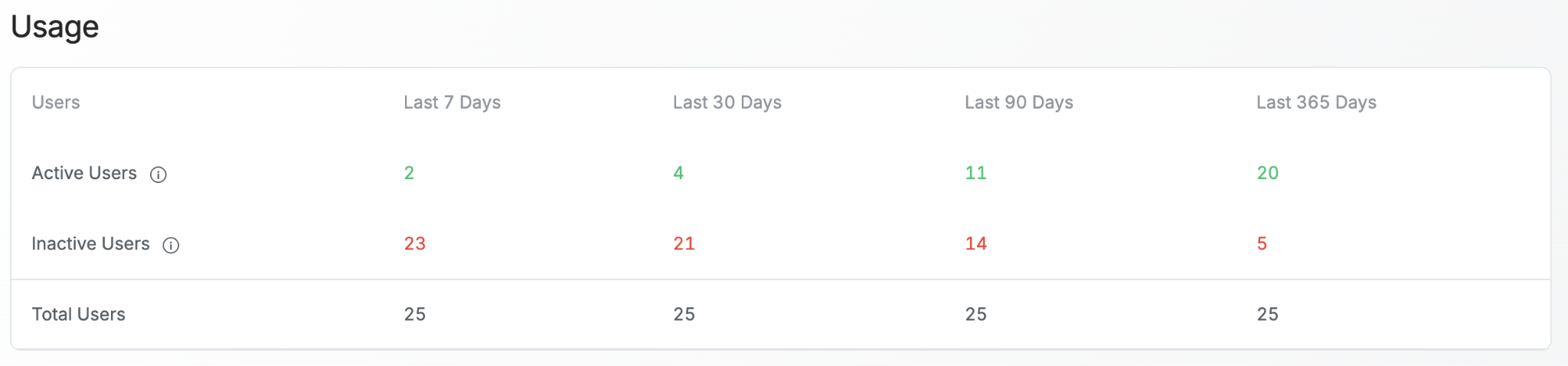
In the example below, there are 25 total users. Of those, two users have logged in within the last seven days and 23 have not; four users have logged in within the last 30 days and 21 have not; 11 users have logged in within the last 90 days and 14 have not; and 20 users have logged in within the last 365 days and five have not.
Questions?
For additional questions about platform usage, please contact support@clozd.com.